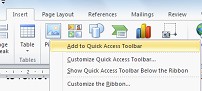
The Quick Access Toolbar is a Microsoft Office toolbar that can be customised with frequently used commands. It is always displayed regardless of the tab on the ribbon you are currently using. To find out how to customise the Quick Access Toolbar you can use one of the three options outlined below.
Using the Quick Options from the drop down menu
- Select Customise Quick Access Toolbar (Button)
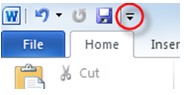
- Select a command from the drop down menu
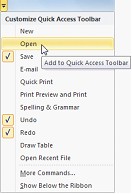
TIP: To remove a command de-select it from the drop down menu
Using the More Commands option from the drop down menu
- Select Customise Quick Access Toolbar (Button)
- Select More Commands….
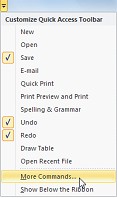
- Select from Popular Commands or All Commands on the drop down list
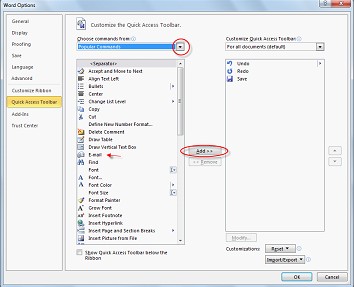
- Select a command from the left menu to add to the Quick Access Toolbar
- Select Add>> (button)
TIP: To remove a command select the command from the right menu and select <<Remove (button)
Adding commands from the Ribbon
- Select the appropriate tab on the ribbon
- Right click the command icon
- Select Add to Quick Access Toolbar (menu item)